Calc84 AI review: the scan-to-calculator breakthrough
A worksheet becomes a working calculator setup. That is the feature that makes Calc84 AI worth a closer look.
Calc84 AI is an 84-style graphing calculator for Android, iPhone, iPad and Mac with an AI scanner that transfers recognized math into the calculator. It lets students scan a worksheet, table or handwritten expression, review the proposed setup and tap Insert. Functions, lists and graph settings are then ready to use.
The appeal is immediate: less time entering the problem, more time exploring it. An affordable lifetime calculator purchase and optional Advanced AI subscriptions also give occasional and regular AI users different ways to pay.
Our take: the breakthrough is usable input
Calc84 AI’s strongest idea is connecting recognition to the next step in a student’s work. A scanned function can be graphed and adjusted. A scanned table can supply the lists for statistical analysis. The camera becomes an input method for the calculator itself.
That connection is a significant advance for worksheet-heavy study. The benefit grows with the amount of notation or data a problem requires. A simple sum is already quick to type; two columns of measurements or a function with several exponents are much better reasons to reach for the scanner.
Our verdict: Calc84 AI is a compelling option for students who want AI assistance inside a familiar calculator workflow. Direct insertion is the feature to choose it for. Its value depends on how often users work from paper and whether their chosen scan allowance covers that routine.
How scanning directly into the calculator works
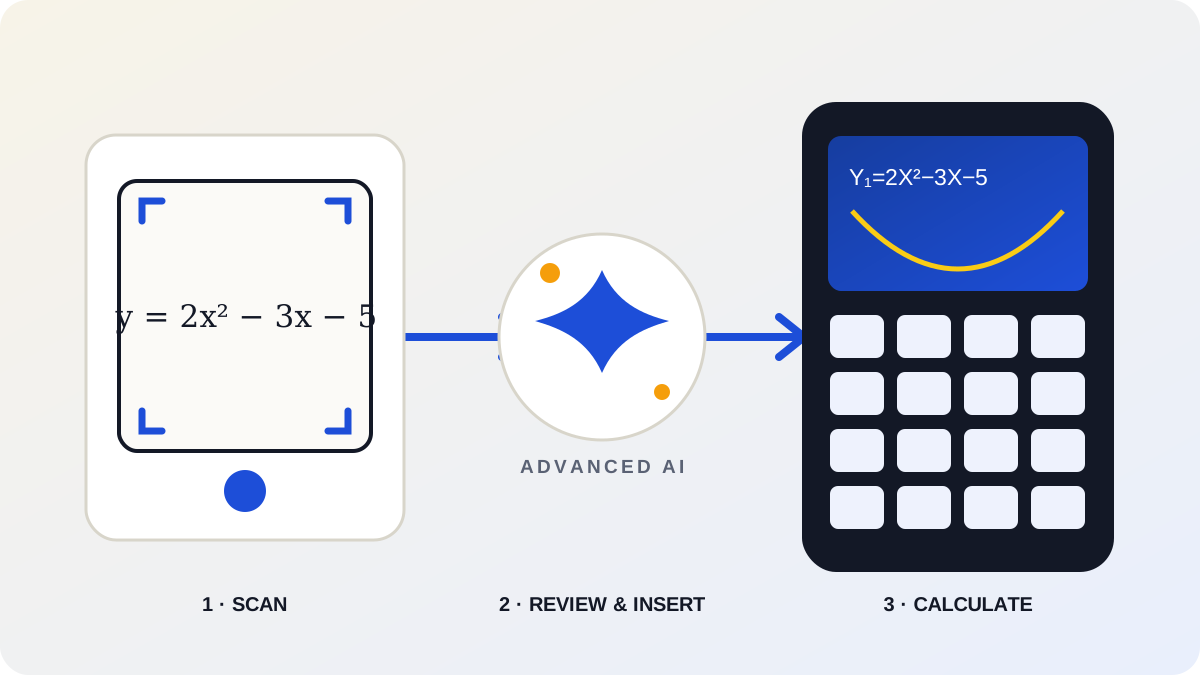
- Capture the math. Photograph a worksheet, a data table or a handwritten expression.
- Review the setup. Check what the scanner recognized, including signs, exponents and table values. Correct anything needed.
- Tap Insert. Transfer the prepared content into the calculator’s functions, lists or graph settings.
- Keep working. Graph, trace, change values or run the relevant calculation using the calculator.
The developer’s App Store description explicitly lists Y= entry, list population and graph-window setup. The Google Play listing describes the same scan-and-insert approach on Android.
Where the feature earns its place
Graphing: from a worksheet to Y=
Consider a worksheet asking students to explore y = 2x² − 3x − 5. The useful outcome of a scan is the expression in the Y= editor. Once inserted, the student can graph it, inspect its intercepts, adjust the viewing window and change a coefficient to see what happens. This example illustrates why editable input matters: the same setup supports several follow-up questions.
Statistics: from a table to calculator lists
A table of measurements presents a different entry problem. Each number must reach the right list before a regression or other analysis can begin. Calc84 AI can populate lists from the scan, leaving the student to check the values and choose the analysis. For repeated statistics assignments, avoiding that row-by-row transcription is a particularly persuasive benefit.
The AI tutor complements these workflows when a student needs help finding a command or following the calculator steps. The scan gets the setup ready; the tutor can help with what to do next.
Lifetime or Advanced AI: which option makes sense?
The lifetime purchase permanently unlocks the calculator and includes a limited starter AI allowance. Advanced AI Plus and Pro subscriptions provide larger ongoing allowances for scans and tutor questions. The subscription plans also unlock calculator functions while active.
| Option | What it provides | Best fit |
|---|---|---|
| Lifetime | Permanent calculator unlock with limited starter AI uses. | Everyday calculation with occasional AI use. |
| Advanced AI Plus | Calculator access and a recurring scan and tutor allowance. | Regular help with homework and worksheets. |
| Advanced AI Pro | Calculator access and larger recurring AI allowances. | More frequent scanning and tutor sessions. |
Lifetime is the sensible starting point for someone who mainly wants a calculator they can keep. Regular scanner users should compare Plus and Pro against their workload. Exact prices, allowances and offers should be checked in the app’s purchase screen for the relevant platform and region.
What to consider before choosing it
The review step is part of the workflow. Handwriting and mathematical notation can be ambiguous, so users should check recognition before inserting the result. Scanning and tutor requests also need internet access and use the applicable AI allowance. The core calculator remains available offline.
These are practical considerations when choosing a plan: how often will the scanner be useful, and will a connection be available when it is needed? For students who regularly work from worksheets or tables, the direct path into a working calculator makes a strong case.
Calc84 AI or GraphNCalc84?
Choose Calc84 AI for scanning, direct insertion and AI-guided help. GraphNCalc84 suits users looking for a conventional 84-style calculator with a one-time purchase and no recurring subscription. Both now have Android versions alongside their Apple versions.
GraphNCalc84 is available on the App Store and Google Play. For other options, see our graphing calculator app comparison.
Calc84 AI: frequently asked questions
What is Calc84 AI?
Calc84 AI is an 84-style graphing calculator with an AI math scanner and tutor for Android, iPhone, iPad and Mac. It can turn scanned math into editable calculator inputs.
Can Calc84 AI insert scanned math directly into the calculator?
Yes. Calc84 AI can prepare Y= functions, calculator lists and graph-window settings from a scan. Review the recognized setup, correct anything needed, then tap Insert to transfer it into the calculator.
What can Calc84 AI scan?
Calc84 AI supports worksheets, data tables and printed or handwritten mathematical expressions. Check the recognized notation and values before inserting them; recognition can need corrections.
Does the lifetime purchase include unlimited Advanced AI?
No. The lifetime purchase permanently unlocks the calculator and includes a limited starter AI allowance. Advanced AI Plus and Pro subscriptions provide larger ongoing allowances for scans and tutor questions.
Is Calc84 AI available on Android?
Yes. Calc84 AI is available on Google Play under the package com.fredinax.calculateai, as well as on the Apple App Store.
Does Calc84 AI work offline?
The core calculator works offline. AI scanning and the AI tutor require an internet connection.
Sources and review basis
This feature review evaluates the documented workflow, purchase options and platform availability. Store descriptions were checked on October 6, 2026. The graphing and statistics scenarios above illustrate how the workflow can be used.
- Calc84 AI on the Apple App Store — scanner workflow, calculator features and purchase options.
- Calc84 AI on Google Play — Android availability and feature description.
- GraphNCalc84 on the Apple App Store and Google Play — the alternative calculator and its buying model.