Taculator 84: the features that make it our editor's choice
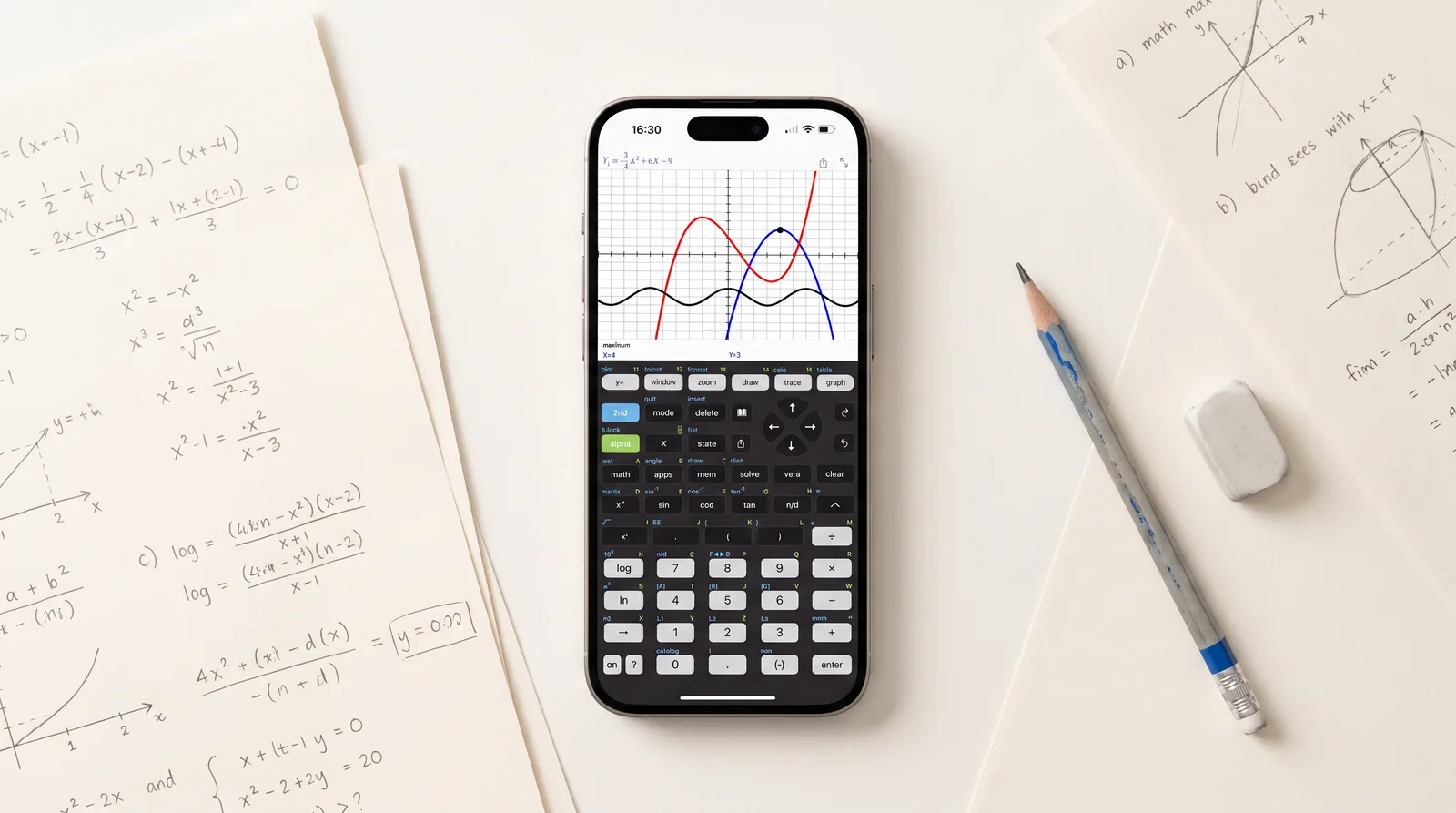
Every app in our comparison gets installed, tapped through and scored against the same coursework checklist. One app keeps coming out on top: Taculator 84, an independent graphing calculator app intended for use with the TI-84 Evo and the TI-84 Plus CE. Not because of a single killer feature, but because it does the whole 84 job, keypad, menus and syntax, for homework when the handheld is not at hand, and then quietly goes further. Texas Instruments still has no phone app of its own, so independent apps fill the gap. Not affiliated with Texas Instruments, Taculator 84 is one of them. Here's what actually earned it the top spot.
1. The keypad your class already taught
The point of an 84-style app is that class instructions still make sense: y=, window, zoom, trace, graph. In Taculator 84 those keystrokes work the same way, with overhauled 2026 menus and MathPrint input, so what you learn in class carries over. The 2.0 update added the Evo-style home screen, Points-of-Interest tracing and the reworked statistics menus. If you prefer a different look, 14 keyboard themes (Classic, Graphite, Silver, Gold, Rose, Mint and more) with a fine-tuning color picker let you restyle every key, and a full dark mode adapts the display, history and every submenu.
2. The apps key: a whole suite the TI-84 Evo dropped
Pressing apps opens a suite of built-in tools — and here's the remarkable part: several of them are exactly the ones Texas Instruments removed from the new TI-84 Evo. Cabri Jr is gone from the Evo; geometry lives on here. The current lineup:
- Geometry — draw points, lines, circles and polygons; measure lengths, angles and areas; explore transformations, animations and loci
- Polynomial Root Finder & Simultaneous Equation Solver
- Finance — Time-Value-of-Money solver, NPV, IRR, amortization
- Probability Simulation — toss coins, roll dice, pick marbles, spin spinners, draw cards
- Science Tools — significant-figures calculator, unit converter, data/graphs wizard, vector calculator
- Transformation Graphing — animate function families with coefficient sliders
- Conics — circles, ellipses, parabolas, hyperbolas
- Inequality Graphing — shade solution regions, including vertical X= inequalities
- Periodic Table — every element with detailed properties
The whole suite is free for everyone for a limited time — if your class still teaches with these tools, this is currently the easiest way to keep using them.
3. A numeric solver that's always one key away
The Numeric Solver handles any equation for any variable — and it now lives both in the MATH menu and directly on the solve key. On the Evo, by contrast, the solver can be locked away entirely by exam mode. Here it's part of the furniture, the way TI-84 students have known it for years.
4. Graphing that uses your phone's actual power
Handhelds draw curves pixel by pixel; a phone doesn't have to. Graphs render instantly and sharply on a high-resolution display, with full-screen mode and pinch-to-zoom on top of the classic window settings. Analysis is the familiar set: trace for values, then calculate zeros, minima, maxima, intersections, integrals and derivatives. Statistical plots — histogram, box plot, scatter, xy-line — are in, as is drawing vertical, horizontal, tangent and circle. Sharing a graph produces an image that matches your light or dark mode, and saving only asks for add-to-photos permission — the app never gets access to your photo library.
5. Statistics, distributions and matrices without shortcuts
The stat list editor, 1- and 2-variable statistics, and every regression a course throws at you: LinReg (both forms), QuadReg, CubicReg, QuartReg, LnReg, ExpReg, PwrReg, Logistic, SinReg. Hypothesis tests from Z-Test to 2-SampleTTest, intervals, and the full distribution catalog — Normal, T, χ², F, Poisson, Binomial, Geometric, including invT. Matrices get their own workflow: store them as [A], [B], [C], then run arithmetic, powers, transpose, determinant, inverse, row echelon and reduced row echelon forms.
6. Help that's built into the catalog
Every command ships with syntax help, an example and its possible error messages in the integrated Catalog. Start typing a command and the correct syntax appears next to the cursor — the feature that makes the app usable for beginners without slowing down anyone experienced.
7. Every platform, no ads, free for schools
Taculator 84 runs natively on iPhone, iPad, Mac and Android — with no account, no sign-in and no internet requirement, and no ads in any tier. Graphing in Taculator 84 is completely free; the advanced Pro functions are currently on promo for a $7.99 lifetime unlock (regular $29.99, or by subscription). And for districts, the school program remains unique in this comparison: the full app, free, via Apple Custom Apps, deployable to managed iPads and Android tablets via MDM.
If you're still deciding, our full comparison of all nine apps shows where everyone else lands — and if you're weighing new hardware instead, read TI-84 Evo vs TI-84 Plus CE.
More: TI-84 Evo vs TI-84 Plus CE · The TI-84 Evo has no Apps menu anymore · The TI-84 Evo online calculator explained · Best calculator apps 2026