TI-84 Evo vs TI-84 Plus CE: every difference that matters
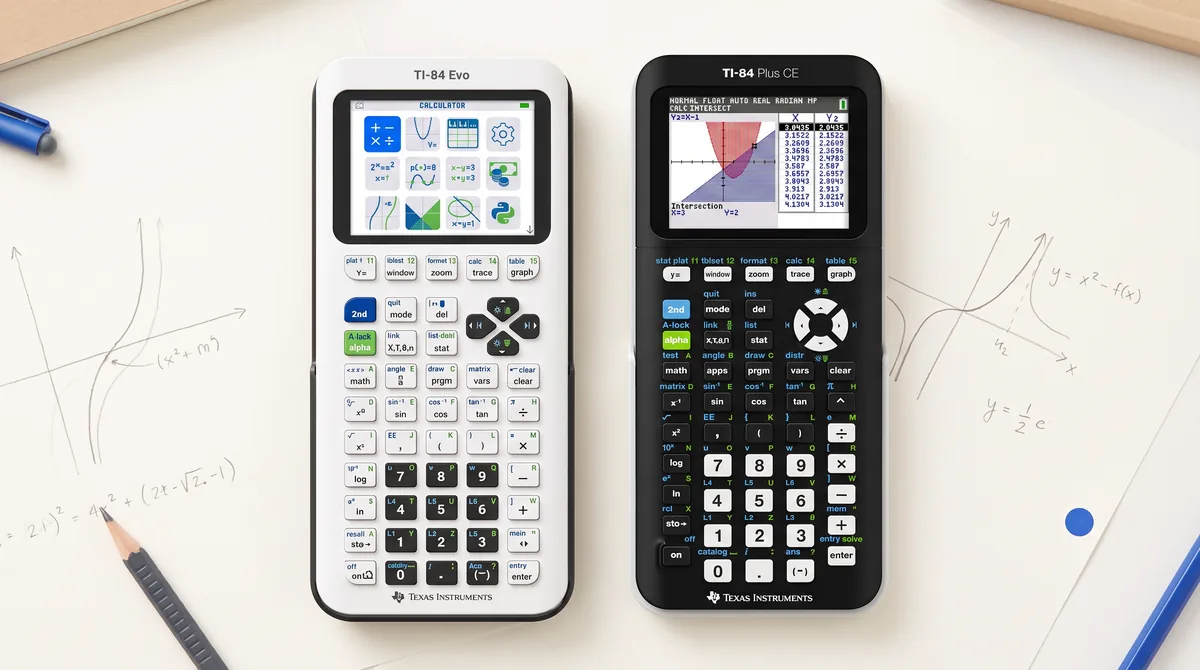
The TI-84 Plus CE has been the default classroom calculator for a decade. With the TI-84 Evo, Texas Instruments has released the first real successor — not a refresh, but a new machine with a rebuilt operating system, a rearranged keyboard and a different philosophy. Both calculators remain on the market. Here is what actually changed, verified on real hardware.
Hardware: faster, wider, USB-C
- 3× faster processor — graphs render noticeably quicker.
- 53% more graphing area: 319 × 209 px instead of 264 × 165 px.
- USB-C replaces the old mini-USB port.
- 3.5 MB usable memory (up from 3.0 MB), 16-bit color display, 15 graph colors.
- Seven case colors.
The keyboard has moved — almost everything you know by heart
This is the change that affects daily use most. If you learned the 84 on a CE, some muscle memory now points at the wrong keys:
| Key | TI-84 Plus CE | TI-84 Evo |
|---|---|---|
| apps | Opens the Apps menu | Gone — replaced by a dedicated fraction key |
| x⁻¹ | Reciprocal | Now x^□ (general exponent); the old ^ position became ÷ |
| + − × ÷ | Right column | Each moved one position up, to make room for the new toggle key ◄► above enter |
| 2nd math | test menu | Same menu, clearer label: = ≤ ≠ > |
| on | Power | Power + Home — opens the new icon home screen |
| 2nd clear | Clear | Now also Undo — restores the last cleared input, repeatable |
The new toggle key ◄► is the most useful addition: it switches answers between fraction and decimal, shows help for catalog entries, and expands the Y= line so long expressions fit without scrolling.
The Apps menu is gone
There is no apps key anymore. What used to live in the Apps menu is now a row of icons on the new home screen: Transformation Graphing, Inequality Graphing, Lines & Conics, Finance, Polynomial Root Finder and System Solver (the old PlySmlt2 app is now two separate tools). What did not make the jump: Cabri Jr, Periodic Table, Science Tools, CellSheet, Probability Simulation and Vernier EasyData are gone — and they cannot be reinstalled, because the new OS runs natively on an ARM processor instead of emulating the old ez80 platform the flash apps were built for. We covered the Apps story in detail →
P.O.I. — Points of Interest
When you trace a function, the Evo can mark zeros, minima, maxima, y-intercepts and intersections directly on the graph — no 2nd calc detour. The catch: it lives on a three-way switch in the Format menu (2nd zoom): POI · ASYMPTOTES · OFF. Choose asymptote detection (which finally stops the calculator from drawing fake vertical lines through rational functions like 1/(x−2)) and you lose the points of interest — and vice versa. You can't have both at once.
Statistics menus: completely reorganized
The stat key now has four tabs instead of three: EDIT · CALC · INTERVALS · TESTS. Confidence intervals and hypothesis tests — one long list on the CE — are now separated, so every menu number you memorized has changed. Distributions moved from 2nd vars to alpha stat and are grouped by distribution (Normal, t, χ², Binomial…) instead of one flat list. Didactically better, but every old cheat sheet is wrong now.
Small things worth knowing
- The default graph window is now ZDecimal, not ZStandard — friendlier trace values (steps of 0.1) on the wider display.
- Results print in green, inputs in black; the multiplication sign is a dot, not an asterisk.
- Three new regressions: PropReg, RecipReg, eBASEReg.
- log opens a log_b(x) template; empty base means base 10.
- Seven OS languages are built in and selected at the bottom of MODE — no language apps needed.
Exams
The Evo is approved for PSAT, SAT, ACT, IB and AP exams. Its test mode is started with the classic 84 key combination at power-on and is granularly configurable (the supervising teacher chooses which tools are locked — Python, solvers, graphing apps).
So which one should you buy?
Get the Evo if you're buying new in 2026: it's faster, the display is bigger, and it's the platform TI will develop going forward. The CE remains perfectly usable — it stays on the market, is often discounted, and every existing textbook and YouTube tutorial matches its menus exactly. One honest caveat for both: whichever you buy, expect a week of re-learning if you switch between them, because the keyboard and the statistics menus are genuinely different.
And if what you actually need is the 84 workflow rather than another $100+ device: the apps in our comparison replicate exactly that on the phone or tablet you already own.
More: What happened to the Apps menu · The TI-84 Evo online calculator explained · Best calculator apps 2026