TI-84 Evo online calculator: what you need to know
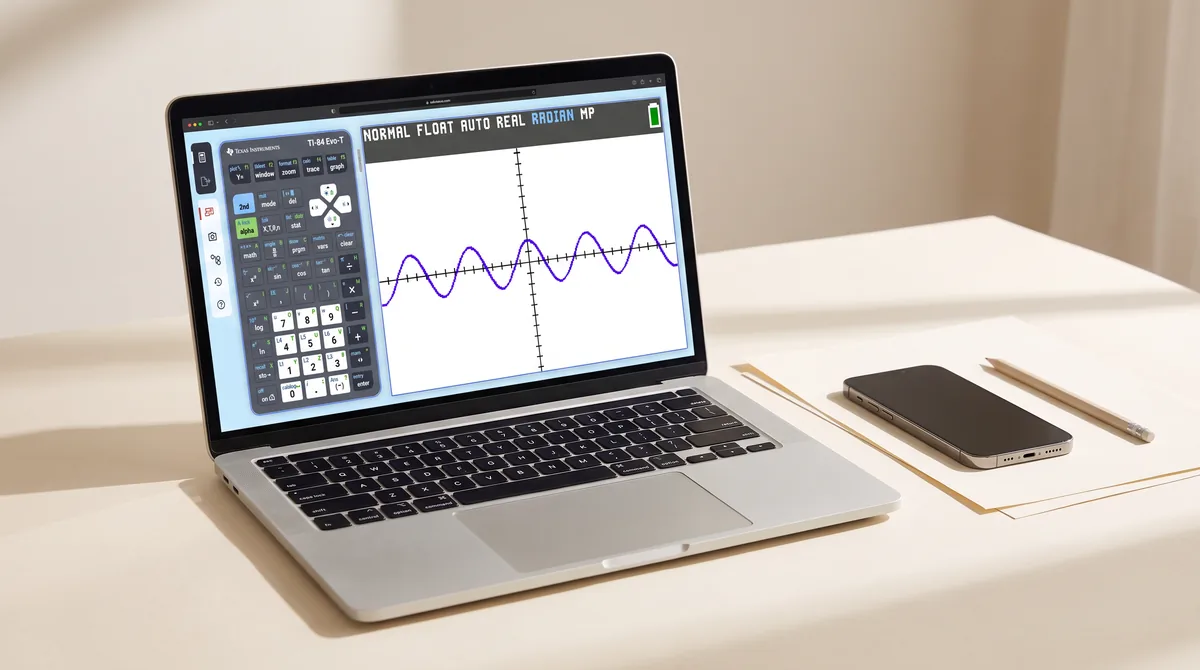
For the first time, Texas Instruments offers the 84 as software you can just open in a browser: the TI-84 Evo online calculator at ti84evo.ti.com. It's the exact factory OS of the new Evo handheld — no emulator hack, no ROM file, made by TI itself. Here's how it works, what it costs, and where its limits are.
What you get
- The complete, unmodified Evo OS: same home screen, same menus, same results — including the new Points-of-Interest tracing and the reworked statistics menus.
- Runs in any modern browser on Mac, PC and Chromebook.
- Perfect for screen sharing in class — teachers can demonstrate keystrokes that match exactly what students see on their Evo handhelds.
What it costs
The online calculator is not sold as a standalone consumer product. A 4-year license comes bundled with the Evo handheld. For schools, TI adds volume licensing: 50 free licenses per 10-pack of teacher devices. If you were hoping to simply subscribe for a few dollars a month without buying the hardware — that's not currently an option.
The structural limits
- Browser-only, with sign-in. There is no offline mode, no desktop app, and — importantly — no phone or tablet app.
- Internet required. No connection, no calculator. On flaky school Wi-Fi, that's a real constraint.
- Not for exams. The Evo handheld is approved for PSAT, SAT, ACT, IB and AP — the online version is a teaching and homework tool, not something you can bring to a test.
- The license expires. After the bundled 4 years, continued access depends on whatever renewal TI offers then.
Online calculator vs. native app
If your calculator use happens at a desk, in a classroom that bought Evo hardware, the online calculator is the most faithful option there is — it's literally TI's own software. But if your calculator lives where homework actually happens — on the bus, on the couch, on your phone — a native app is simply the more practical form factor:
| TI-84 Evo online | Native 84-style app | |
|---|---|---|
| Authenticity | Exact factory OS | Re-created 84 keypad & menus |
| Works offline | No | Yes |
| Phone & tablet | No | Yes (iPhone, iPad, Android) |
| Cost | License bundled with Evo handheld | Free tiers or one-time purchases |
| Best context | Classroom demos, schools with Evo fleet | Homework, studying, anywhere |
Is there a TI-84 Evo app for iPhone? No official one. Texas Instruments does not ship a phone or tablet app. Independent apps fill that gap. Taculator 84 is an independent app intended for use with the TI-84 Evo and the TI-84 Plus CE: offline, no ads, on iPhone, iPad, Mac and Android. Its 2.0 update added the Evo-style home screen, Points-of-Interest tracing and the reworked statistics menus, so the keystrokes your teacher shows in class work the same way on the phone. Not affiliated with Texas Instruments.
We compare all the native options — including which ones show ads and which don't — in our 2026 calculator app comparison.
More: TI-84 Evo vs TI-84 Plus CE · What happened to the Apps menu · Best calculator apps 2026